py4cytoscape Logo
0.0.10
  • Install
  • Tutorials
    • Overview of py4cytoscape
    • Cytoscape and igraph
    • Importing data
    • Cancer networks and data
    • Identifier mapping
    • Custom Graphics and Labels
    • Filtering Networks
    • Analyse coexpression with MCODE
  • Concepts
  • Reference
  • Logging
  • Release Log
  • License
  • Credits
  • Citing
Function Index
py4cytoscape
  • Docs »
  • Tutorials
  • Edit on GitHub
Next Previous

Tutorials

You can try the following tutorials with Cytoscape Desktop + Google Colab.

  1. Install Cytoscape in your local desktop environment and launch it.

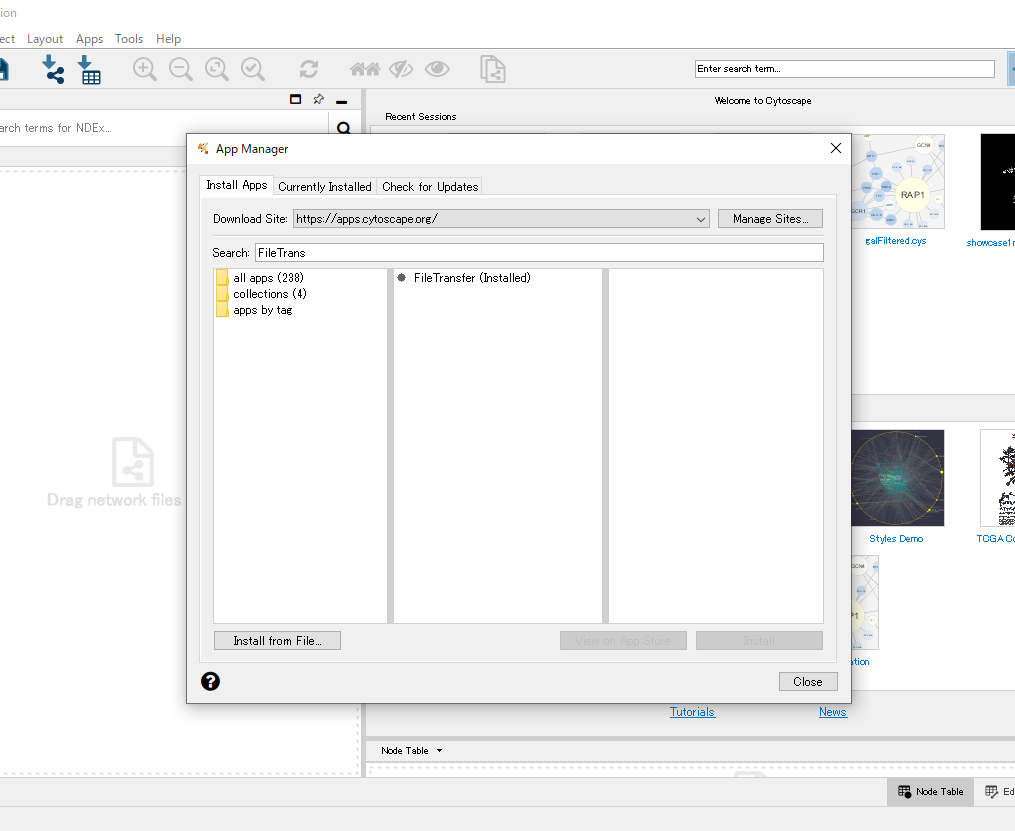
  2. If you’re using Cytoscape 3.8.2 or earlier, install FileTransfer App with Cytoscape App Manager (by clicking the Apps in the Cytoscape menu bar -> App Manager..)

../_images/InstallingFileTransferApp.png
  1. Click on the “Open in Colab” badge in the tutorial below.

  • Overview of py4cytoscape
    • Prerequisites
    • Getting started
    • My first network
    • Biological graph example
    • Browse available functions
    • More examples
    • Development
    • Credits
    • References
  • Cytoscape and igraph
    • Prerequisites
    • From igraph to Cytoscape
    • From Cytoscape to igraph
  • Importing data
    • Prerequisites
    • Always Start with a Network
    • Import Data
  • Cancer networks and data
    • Prerequisites
    • Getting Disease Networks
    • Interacting with Cytoscape
  • Identifier mapping
    • Prerequisites
    • Example: Species specific considerations
    • Example: From proteins to genes
    • Example: Mixed identifiers
    • More advanced cases
  • Custom Graphics and Labels
    • Prerequisites
    • Open Sample
    • Custom Graphics
    • Enhanced Graphics
  • Filtering Networks
    • Prerequisites
    • Get network from STRING
    • Filtering by degree
    • Filtering by attribute
    • Combining filters
    • Hiding filtered nodes
  • Analyse coexpression with MCODE
    • Prerequisites
    • Clear all networks at the begining
    • Import Co-Exp Data and Rename columns
    • Create network with co-exp data and give random network name
    • Run analyze command so your network will be one way directed
    • Run mcode command with options (you can change network settings)
Next Previous

© Copyright 2021-2021, The Cytoscape Consortium Revision 5a5c3254.

Built with Sphinx using a theme provided by Read the Docs.